How to Connect Autodesk Platform Services to VCAD
To upload and view files in Autodesk formats (Revit, Navisworks, DWG and others), you’ll need to enable the integration between VCAD and Autodesk Platform Services (APS).
This integration works through an APS app that you create yourself: from this app you’ll get a Client ID and a Client Secret, two codes that you’ll need to enter into VCAD to authorize the connection.
This is a one-time setup, takes about 10 minutes, and is free for standard trial usage.
1. Sign in to Autodesk Platform Services
Go to aps.autodesk.com and sign in. If you don’t have an Autodesk account yet, you can create one for free.
2. Activate the Free plan
On the Pricing page, select the Free plan.
3. Create (or select) a Hub
A Hub is the “container” of your Autodesk account where the integration app will be created. Go to the Hub management page and use an existing Hub, or create a new one if you don’t have one yet.
4. Create the APS app for the integration
Inside your Hub, click Create application, enter a name and description (e.g. “VCAD Integration”), then click Create app.
This app is what generates the credentials needed to connect VCAD to Autodesk.
5. Copy the Client ID and Client Secret
On the new app’s page, you’ll find the Client ID and the Client Secret.
6. Enter the credentials in VCAD
In VCAD, open the file manager, click the settings icon in the top right, select APS Credentials, and paste in the Client ID and Client Secret.
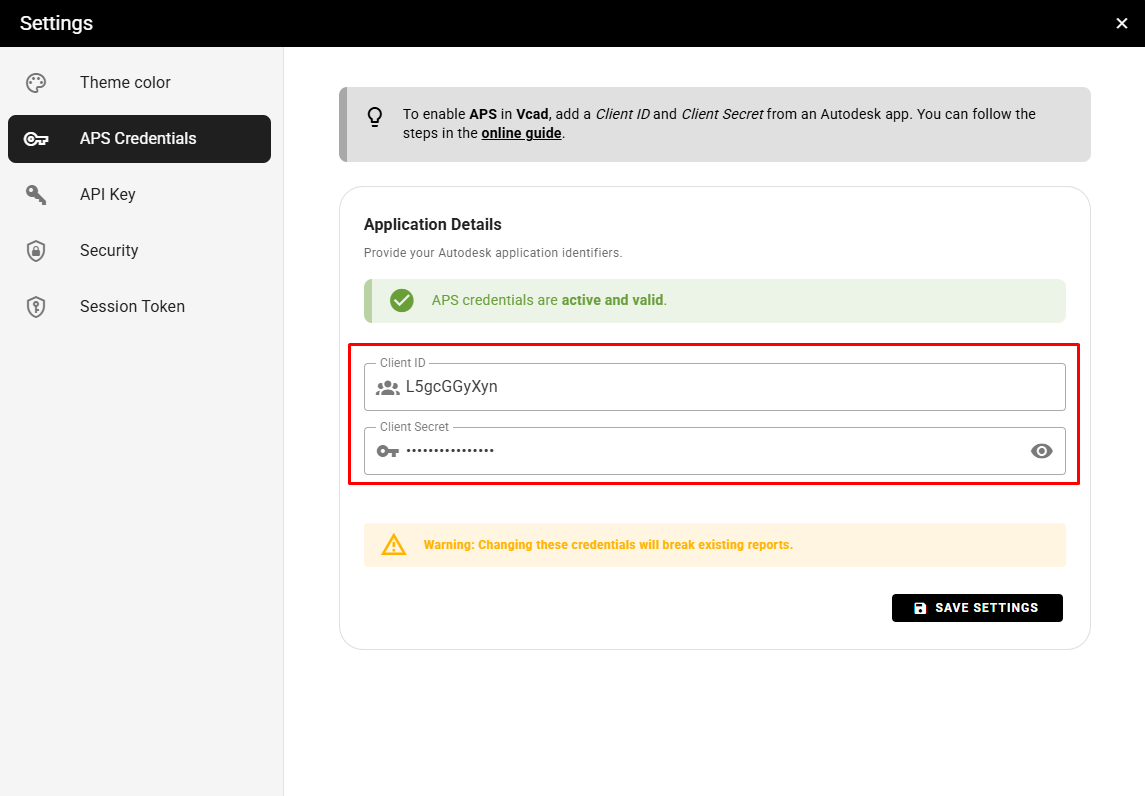
The integration will now be active: you’ll be able to upload and view your Revit, Navisworks, DWG and other Autodesk format files directly in VCAD.
FAQ
APS is Autodesk's service used to convert and view Autodesk formats such as RVT, NWD, NWC and DWG in Vcad. You only need it if you plan to import these formats; IFC files work in Vcad Standalone without any additional setup.
Yes, for standard trial and light usage. The Free tier includes up to 20 complex file conversions (Revit, Navisworks, IFC) per month, at no cost.
Autodesk requires a valid credit card to enable the Free tier, but no charge applies as long as you stay within the free monthly limits.
About 10 minutes. It's a one-time setup: once your Autodesk account is connected, Vcad remains configured for future uploads.
Yes. You can start with IFC files right away and connect APS whenever you're ready to import Revit, Navisworks or DWG files.