
A bill of quantities by level and material is one of the first things people ask of a BIM model: how many square metres of each wall type, how much concrete, on which floor. Building one in Power BI usually means mapping properties, converting units, grouping materials and setting up the 3D viewer by hand.
Vcad already works with AI assistants. Download the template of the model as a Power BI project, ask one question and let the assistant build the page. No code to write, no connector to install and no extra data: everything comes from the model. A free kit has the prompt and the steps to try it on a sample model.
From the Vcad template to the finished bill of quantities, in about a minute and a half.
What you need
Four things, all free to start with.
A Vcad account
The free account includes the Samples folder with Snowdon Towers, a Revit model with walls, floors, roofs and curtain walls.
Power BI Desktop
To open the project, refresh the quantities and see them on the 3D model.
An AI assistant
It has to read and write files in a folder: Claude Desktop and Claude Code both do.
The kit
The first prompt, the steps and the full conversation of the demo. No data files: everything comes from the model. Download (5 KB)
Three steps
About fifteen minutes, most of it talking.
Download the template as .pbip from Vcad
Sign in, open Samples, select
Snowdon Towers Sample Architectural.rvt, click Download template, then Download .pbip. Unzip it into an empty folder. A Power BI project (.pbip) is made of text files: an assistant can read and edit it.Talk to the assistant
Open the folder with your AI assistant and paste the prompt below. It reads the model data, tells you what is really there (units, levels, missing materials), asks you a few questions (what to count, how to group the materials, the layout you prefer) and builds the page.
Open it in Power BI
Open the
.pbipin Power BI Desktop and click Refresh. The new page shows the KPIs, the area by level and material family, the floor by floor table and the 3D model coloured by material family.
The first prompt
Paste it as it is, then answer the assistant’s questions.
This folder has the VCAD Power BI project of the Snowdon Towers building. I'm preparing a bill of quantities: I need to see, floor by floor, how much of each material there is (areas and volumes), with the 3D model coloured by material. Build me a page.
What the report shows
The page the assistant builds answers one question: how much of each material is there, floor by floor. At the top, the KPIs: total area, total volume, elements, materials and the share of the area with a real material, with slicers for level and material family. On the left, a stacked bar chart of the area by level, coloured by material family, and below it the floor by floor table with level, family, material, area, volume and elements. On the right, the 3D model coloured with the same families, with everything outside the bill of quantities in light grey. Pick a level in the slicer or in the chart and the 3D jumps to that floor. In the demo the bill counts 1,945 elements: 21,307 m² and 4,230 m³ over 54 materials.
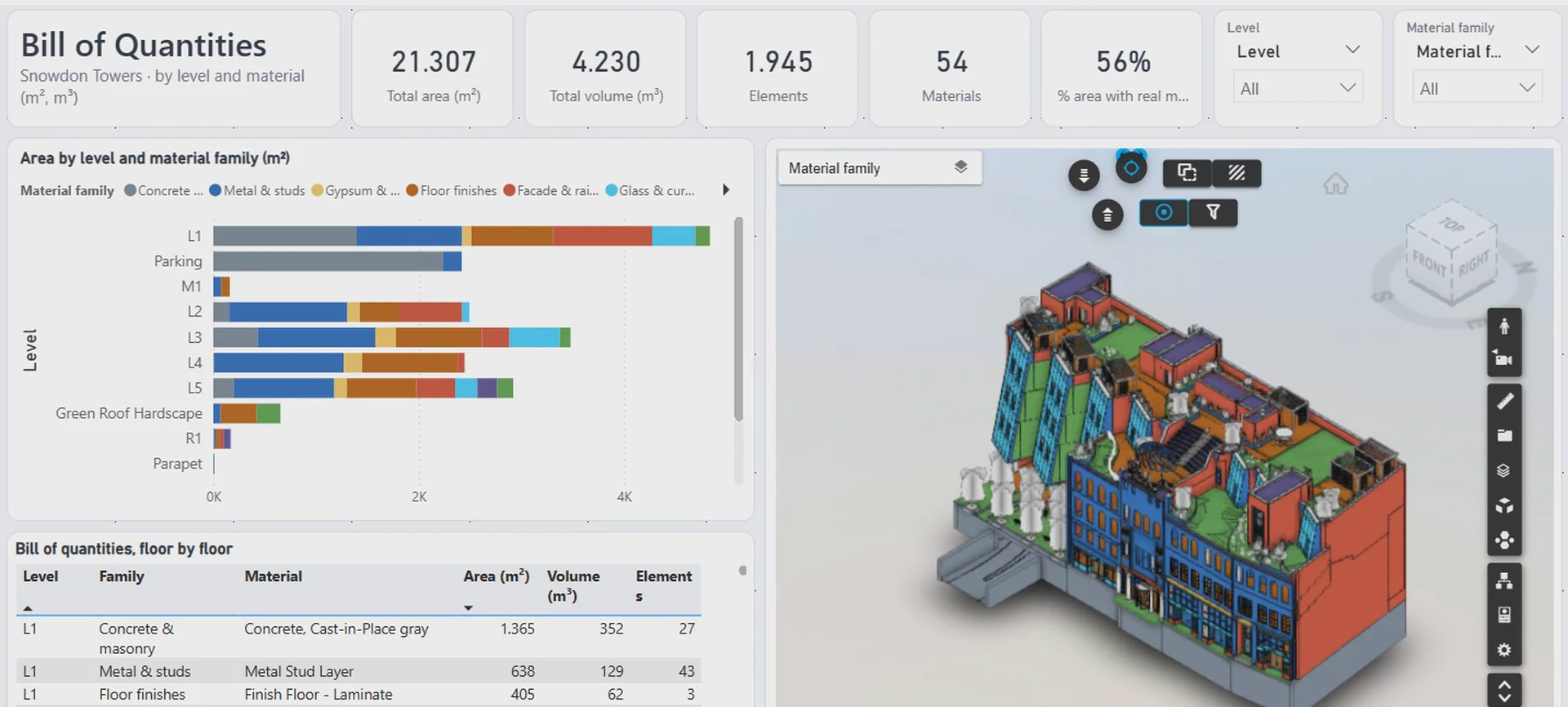
The page built by the assistant: KPIs, the area by level and material family, the floor by floor table and the 3D model coloured by family.
What the assistant had to solve
Model data is real data: it needed checking before it could become a bill of quantities. The template reads the model live from Vcad on every refresh, so the assistant could look at the same 7,714 objects and check every number before building anything.
Units, levels and scope
- Areas and volumes came in square and cubic feet. The assistant asked, then converted them to m² and m³.
- Levels were spread over different fields (Level, Base Constraint, Base Level) and L1 was split into three blocks: it merged them into one L1, as asked.
- 462 curtain wall panels had no level: they took the level of their host wall. Rooms were left out, because they are spaces, not material.
Materials and the 3D
- Each element carries one material, and about 30% of the area had none. The assistant used the type name instead and added a KPI with the share of the area with a real material.
- 54 materials are too many colours to tell apart, so it grouped them into families with the same colours in the chart and in the 3D.
- The 3D first opened in grey. The assistant read the code of the Vcad viewer, found that colour fields are numbered from 1, not 0, and fixed the setting.
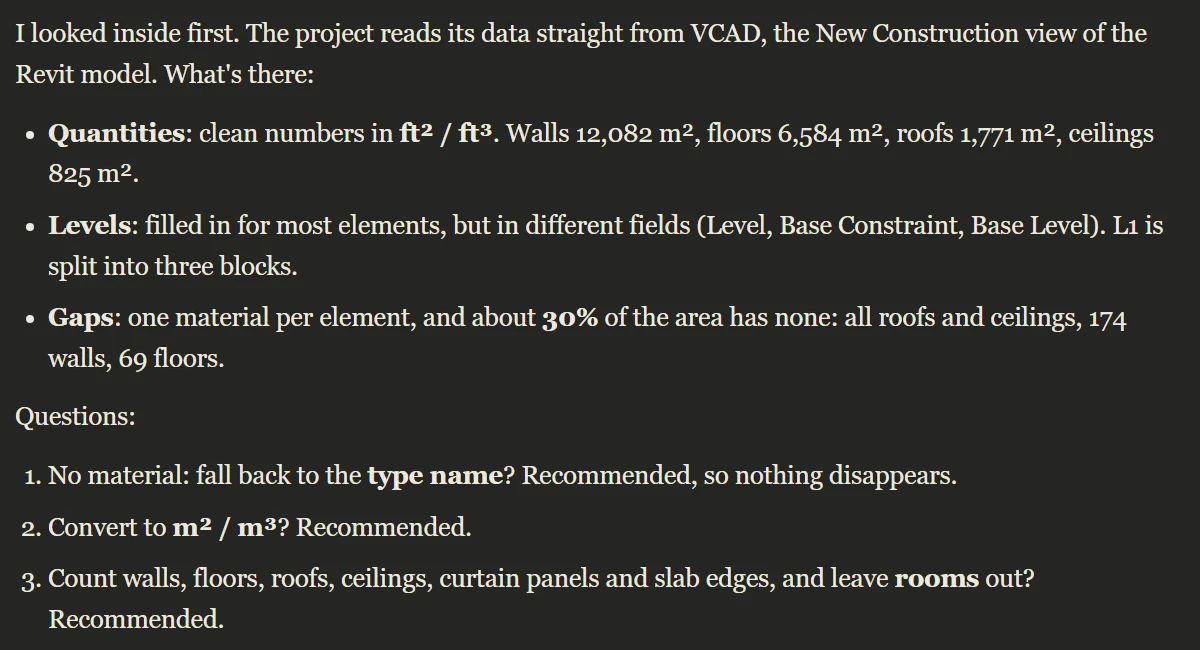
Before building anything, the assistant reports what is really in the model and asks what to count.
Use it on your own models
The same steps work on any model in Vcad. Upload the model, download its template as a .pbip and ask your question. The quantities are the ones written in the model: the assistant tells you where they are missing and where a material comes from the type name instead. The project contains the key to your model: keep it private, as you would a password.
For more on quantities in Vcad, see the quantities and materials dashboard and cost and time monitoring with 5D BIM reporting. For another report built with an AI assistant, see a 4D report in Power BI built with AI, or read our guide to Power BI integration with BIM.
FAQ
No. The MCP server, coming soon, will let AI assistants work on your Vcad models directly. This example shows what is possible today with files alone.
Yes, by level and by material, with areas, volumes and element counts, as in this example. Vcad brings the material of each element into Power BI. For walls and floors that is the material of the core layer, so quantities split by layer, as in a Revit Material Takeoff schedule, are not included.
The assistant checks the units before converting anything. In the Snowdon Towers model, areas and volumes came in square and cubic feet, so it asked and converted them to m² and m³. With your own models it runs the same check, so you know which units the numbers are in.
They do not disappear from the bill. The assistant proposes to use the type name instead, for example "Finish Floor - Laminate", and the report shows the share of the area with a real material: 56% in the demo. You can see at a glance how much of the bill relies on type names.
The approach is the same, but this example uses a Revit model. In an IFC file the levels are the building storeys, and the quantities depend on how the file was exported: if it carries base quantities, the assistant can use them. For IFC examples in Vcad, see 4D construction from an IFC file and IDS model checking on IFC data.
The page gives you the quantities. To turn them into costs you need a unit price for each material or family, joined to the quantities. For cost and time on a Vcad model, see cost and time monitoring with 5D BIM reporting.
Claude is a product of Anthropic. Vcad is not affiliated with Anthropic.