An IDS tells you whether a model carries the data it is supposed to carry. It is the open buildingSMART standard for writing information requirements in a form software can check automatically. This article shows what an IDS catches when it runs on IFC data converted with Vcad, what it misses, and how plausibility checks and the 3D model fill the gap.
What an IDS checks
An IDS states requirements element by element: storeys named in a given format, walls with LoadBearing and IsExternal, external walls with a thermal transmittance, spaces with a name and a floor area. A checker reads the IFC, applies each rule to the elements it concerns and returns pass or fail. Rules can also restrict a value to a range, a list or a format.
For this test we used an IDS based on BIM basis ILS, the Dutch baseline for BIM information delivery published by buildingSMART Benelux. Using a public specification instead of rules written for the occasion is what makes the results comparable with other tools.
Where an IDS stops
An IDS evaluates each element against its own rule. It does not look at the model as a whole, and some problems only appear at that level.
Values that never change. If a property carries the same value across an entire model, each value is valid and every rule passes. A default left unchanged only shows when elements are compared with each other.
Values that are present but not credible. A thermal transmittance can sit in the right field, with the right data type, and still be a number no insulated wall would have.
What the rules do not ask for. A property stored under an unexpected name is invisible to a rule that looks for the correct one.
The report
Two families of checks run on the same converted model. The IDS rules verify that data is present and correctly formatted. The plausibility checks look across the model for data that is present but not believable, and mark it as suspect. Every check reports how many elements it examined and how many pass, fail or look suspect.
What the demo model shows
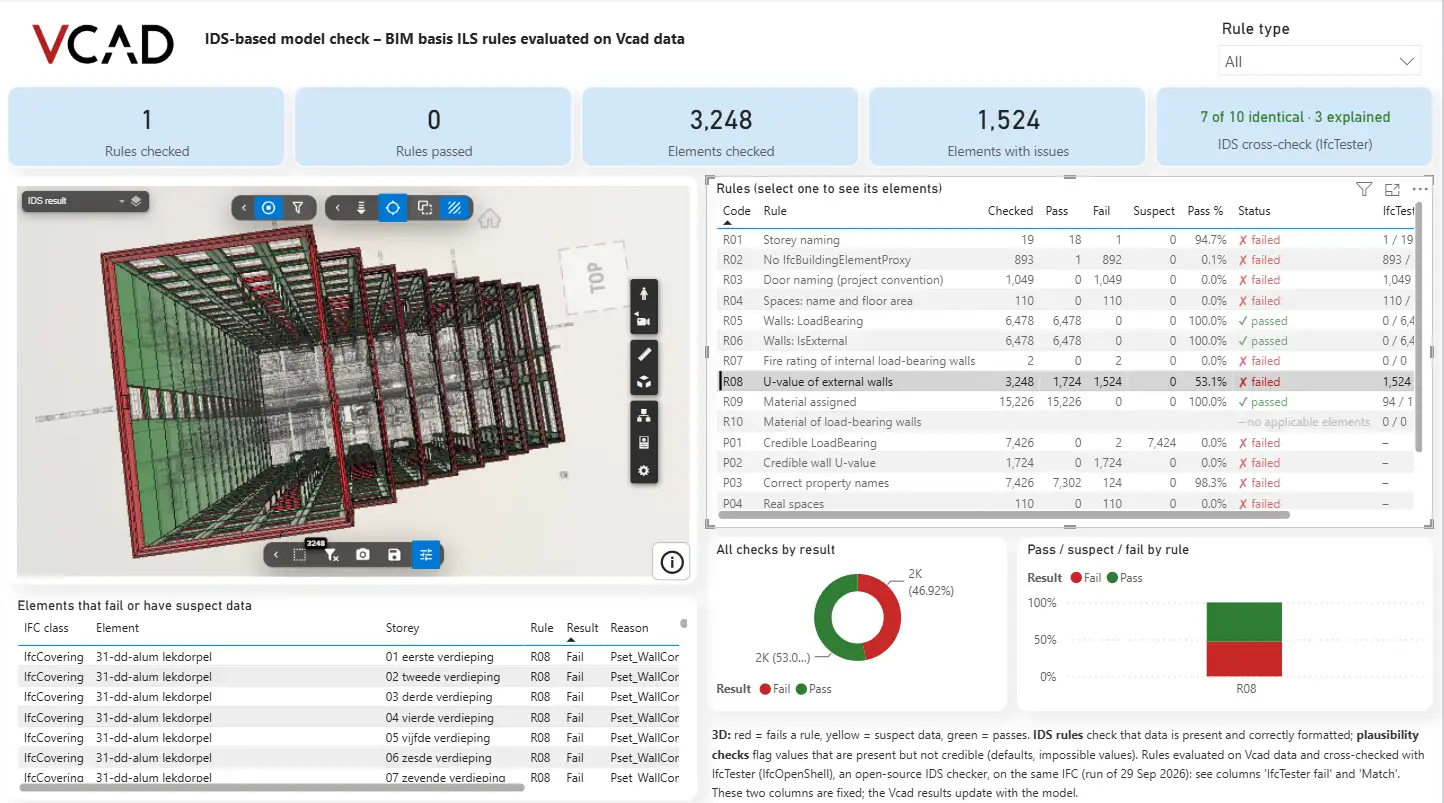
Read the IDS rules alone and the picture is mixed but familiar: some requirements are met, others are not. The rules on LoadBearing and IsExternal pass on every wall, and every element has a material assigned.
The plausibility checks change that reading. On LoadBearing, almost the entire model is flagged as suspect: the property is there, but its values do not behave like those of a real building.
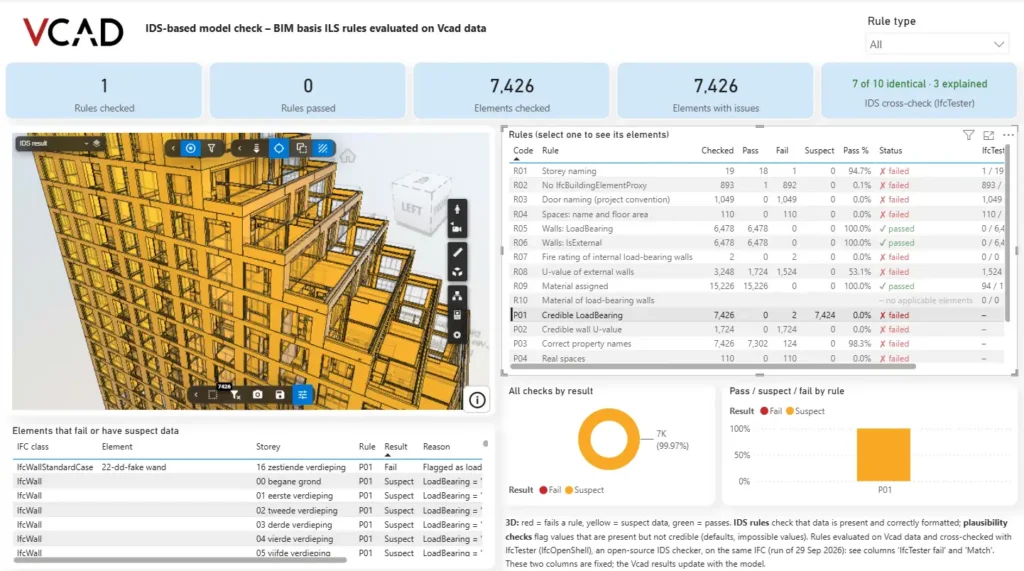
Plausibility on LoadBearing. The model turns yellow: the data passes the IDS rule and is still not credible.
The thermal data tells the same story. About half the external walls carry a U-value, enough to pass part of the IDS rule. The plausibility check then looks at those values, and none of them hold up: the report lists figures such as 4.5 W/m²K on walls described as cavity insulated.
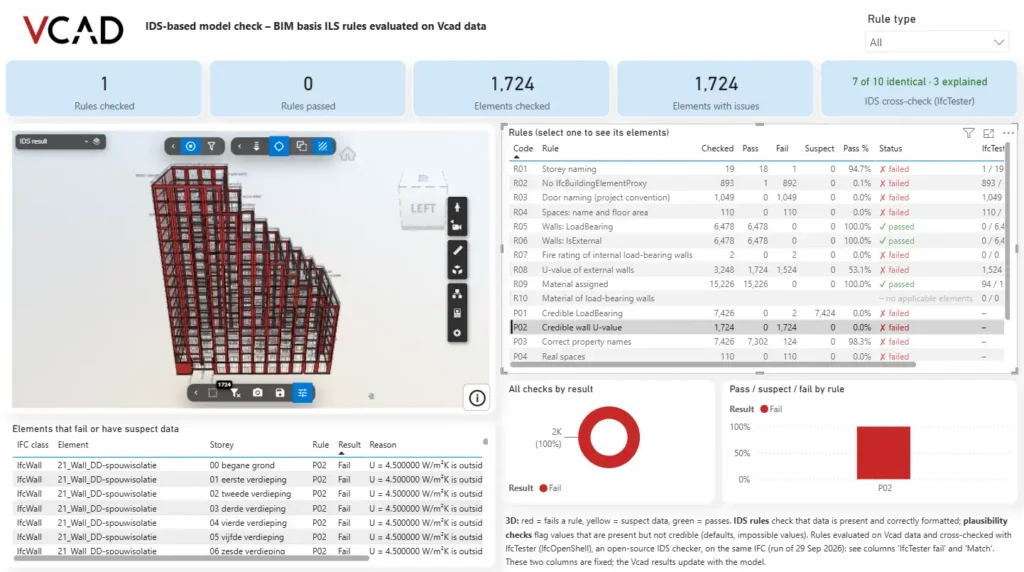
Plausibility on wall U-values. Every wall that carries a value is flagged, because the value is not credible for that construction.
A third check finds properties stored under names the rules do not expect. No IDS rule fails on them, because no rule is looking.
Cross-checked against an open source checker
Rules evaluated on converted data raise a fair question: do they agree with a dedicated IDS checker? The same IDS was run on the same IFC with IfcTester, the open source checker from IfcOpenShell, and the comparison sits in the report itself. Seven of the ten rules return identical results, and the three that differ are explained next to the result. The reference run is fixed, while the Vcad results update with the model.
Seeing it on the model
A list of failed checks tells you something is wrong. It does not tell you where. Here the result is painted on the building: red for what fails a rule, yellow for what looks suspect, green for what passes. Selecting a rule isolates the elements it concerns, and the table below the model lists them one by one with the reason, the storey and the IFC class.
That turns a validation report into something you can act on, and something you can hand to whoever has to fix the model.
What you need
- an IFC model uploaded to Vcad and converted;
- the rules you want to check, from a public IDS or from your own information requirements;
- the Vcad Power BI template connected to the project;
- a Power BI license, the one your team already uses.
The rules live in the report as measures, so they can be adapted to a different specification, extended with your own plausibility checks, and rerun on every revision by refreshing the model. Model data you can trust is where quantity take-off, cost estimating and handover start.
See it in practice
Explore all the reports built with Vcad on our Power BI examples page, or see the same approach applied to code compliance checks and construction progress.
You can sign up and try Vcad, or request a demo.
FAQ
Information Delivery Specification, the open buildingSMART standard for writing information requirements in a machine readable form. It states what an IFC must contain, element by element, so that software can verify it automatically.
The Dutch baseline for BIM information delivery, published by buildingSMART Benelux. It sets the minimum information an IFC should carry when it is exchanged between project parties, such as storey naming, correct IFC classes, spaces with a name and floor area, wall properties and materials.
Partly. An IDS can restrict a value to a range, a list or a format, so some impossible values can be caught. What it does not do is look at the model as a whole: it will not notice that a property never changes across thousands of elements, or that a value is valid on its own but not credible for that element.
The same IDS was run on the same IFC with IfcTester, the open source checker from IfcOpenShell. Seven of the ten rules return identical results, and the three that differ are explained in the report.
Yes. The rules live in the Power BI report as measures over the converted model, so they can be replaced with your own information requirements, extended with further plausibility checks, and rerun on each revision by refreshing the model.